

Product Photography
Men's T-Shirt: Sport & Lifestyle Campaign AI Photo Prompt



Four-panel men's T-shirt sport and lifestyle campaign from a garment reference.
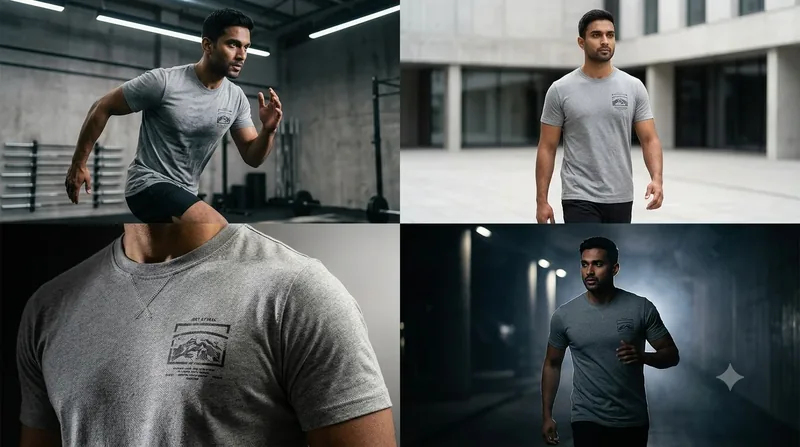
Example output for Men's T-Shirt: Sport & Lifestyle Campaign
The Prompt
mens-t-shirt-sport-and-lifestyle-campaign.md
Use the uploaded T-shirt reference as the exact garment reference.

Create a cinematic men's fashion campaign using one **16:9 horizontal canvas**.

Exactly four equal side-by-side photographic panels:

[ 01 ] [ 02 ] [ 03 ] [ 04 ]

### FRAME 01 - ATHLETIC HERO

Lens:
**35mm**

Aperture:
f/3.2

Camera:
Low 3/4 perspective.

Environment:
Contemporary gym or industrial athletic space.

Lighting:
Strong overhead practicals combined with directional side light.

### FRAME 02 - NATURAL DAYLIGHT

Lens:
**50mm**

Aperture:
f/2.8

Camera:
Eye-level.

Environment:
Minimal urban outdoor setting.

Lighting:
Soft natural daylight.

Keep the clothing texture extremely realistic.

### FRAME 03 - CLOSE FABRIC SHOT

Lens:
**100mm macro**

Aperture:
f/4

Show:

* fabric weave
* stitching
* collar
* print
* sleeve

Lighting:
Hard side strip light creating controlled texture highlights.

### FRAME 04 - NIGHT PERFORMANCE

Lens:
**70mm**

Aperture:
f/2

Environment:
Dark architectural environment.

Lighting:
Strong backlight with subtle atmospheric haze and controlled foreground fill.

### STYLE

Premium sports-fashion advertising.

Dynamic but realistic.

Professional cinema-camera quality.

Natural human anatomy and realistic clothing physics.

No cartoon.
No CGI.
No artificial-looking model.

`SHOW_HUMAN = OFF` by default.

If enabled, use only realistic human interaction appropriate to the scene.

Preserve the exact T-shirt design from the reference.
Negative prompt
Included when you copy the prompt
text, watermarks, signature, logo alterations, distorted proportions, low resolution, blur, compression artifacts
Replace every {{variable}} with your own details before running the prompt.
Collection: AI Grid Prompts for Product & Fashion Photography
Examples
Example input
Upload any product, clothing, or reference photo.
What you should get
A photorealistic commercial campaign of the uploaded reference image rendered in Men's T-Shirt: Sport & Lifestyle Campaign.

How to use this AI photo prompt
- Upload a clear reference photo of your face (well-lit, front-facing works best).
- Fill any placeholders on this page, then tap Copy Prompt.
- Paste into ChatGPT (also works with Gemini, Flux) and generate.
- Keep your face locked - only wardrobe, pose, and scene should change.
Privacy: Upload your photo inside ChatGPT, Gemini, or your AI tool — not on this site. We don't store your photos.
Works best with ChatGPT / Gemini / Flux
Identity-preserving image-to-image prompts need a strong face reference. Avoid heavy beauty filters on the upload and use the negative prompt when your tool supports it.
Tips for better product photography results
- Match the example aspect ratio when your tool allows it (often 4:5 for portraits).
- If the face drifts, re-upload a sharper photo and keep the same prompt text.
- Copy related product photography prompts below to try alternate looks with the same identity lock.
When to use this prompt
Use it when
- You have an uploaded product or fashion reference image
- You want to generate multi-frame cinematic grids (2, 3, or 4 panels)
- You need high-end studio lighting and commercial photography
Skip it when
- You only need a one-line ask with no constraints, format, or context.
- You want a modern digital look or heavy filter effect instead of the era/style this prompt targets.
How to get a good result
Done when
A photorealistic commercial campaign of the uploaded reference image rendered in Men's T-Shirt: Sport & Lifestyle Campaign.
Common mistakes
- Pasting without replacing {{placeholders}} or bracketed blanks.
- Asking ChatGPT, Gemini, Flux, Midjourney, or Stable Diffusion for a shorter answer after a long structured prompt - that throws away the format rules.
- Stopping when the first draft appears instead of checking it against the success criteria below.
FAQ
- Which AI tools is this prompt written for?
- It works best with ChatGPT, Gemini, Flux, Midjourney, Stable Diffusion. Copy the filled prompt and paste it into the tool you already use.
- What should a good result look like?
- A photorealistic commercial campaign of the uploaded reference image rendered in Men's T-Shirt: Sport & Lifestyle Campaign.
- What are common mistakes with this prompt?
- Pasting without replacing {{placeholders}} or bracketed blanks. Asking ChatGPT, Gemini, Flux, Midjourney, or Stable Diffusion for a shorter answer after a long structured prompt - that throws away the format rules. Stopping when the first draft appears instead of checking it against the success criteria below.
Best for
- Commercial product & fashion photography campaigns
- Multi-frame cinematic grid generation from single reference image
- Advertising posters, e-commerce, and Instagram grids
Related Prompts
More prompts like this — same topic and style.


