

Works with ChatGPT, Gemini, Flux, Midjourney


Master End-to-End Flow
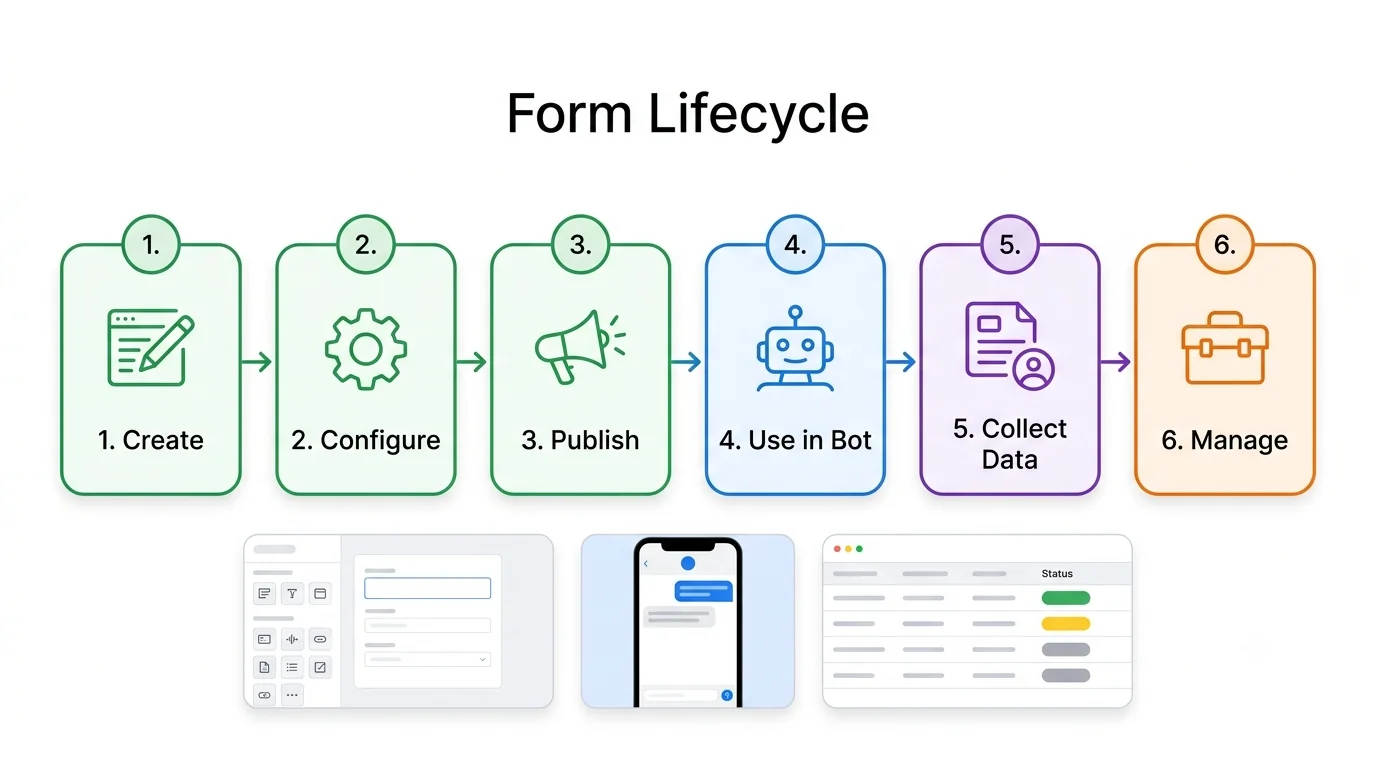
One presentation-ready infographic for any feature: lifecycle strip, flowchart, builder, list view, usage, and delete flow.
53 of 53 prompts
Copy-and-paste prompts that turn any feature into an end-to-end flow, architecture diagram, UI mockup, or product spec sheet.
Product Flow Diagram Prompts is Codextroop's free library for turning a feature, system, or process into a one-page visual.
Fill the bracketed blanks with your product and one example business, then paste into ChatGPT, Gemini, or Midjourney. The pack covers end-to-end feature flows, chatbot and messaging, AI pipelines, business operations, technical diagrams, and UI planning.
Paste the Flow Diagram Style Block at the end of any prompt so every diagram shares the same colors, type, and arrow rules.
Free to browse and copy — no account required.
53 prompts
One presentation-ready infographic for any feature: lifecycle strip, flowchart, builder, list view, usage, and delete flow.
Horizontal pipeline showing how a product auto-generates a bot, report, or campaign, plus runtime architecture.
UI screen of a node-based flow builder with a node library, canvas, minimap, and properties panel.
One-page product spec: decision diamond, priority logic, management screen, editor, data model, and benefits.
End-to-end broadcast campaign diagram with audience filters, a builder mockup, and a delivery report table.
RAG pipeline from sources through embed, retrieve, and cited answers, with failure callouts.
Meta-prompt: give a feature, product, and industry and get a full end-to-end flow image prompt back.
WhatsApp template lifecycle from draft through review, approval or rejection, and a live phone preview.
Bot-to-agent handover with queue rules, a shared inbox mockup, and a return-to-bot step.
Chatbot lead capture from entry point through scoring, CRM record, assignment, and follow-up.
Payments inside chat from catalog to invoice, with phone previews and a failed-payment branch.
Architecture of WhatsApp, Instagram, web chat, and LinkedIn merging into one inbox.
Notification system from triggers through channel selection, template, delivery, retry, and a log table.
Signup through first success, with a UI thumbnail, drop-off risk, and error branches at each step.
Agent loop of plan, tool, observe, and decide, with memory, guardrails, and a fallback path.
Multi-step prompt chain with the prompt and data format shown on each step card.
Dashboard infographic for bot accuracy, hallucination, fallback, resolution, and a review queue.
Six-stage journey map with actions, touchpoints, emotions, pain points, and opportunities.
Lead-to-customer funnel with conversion rates, automation triggers, and a CRM pipeline board.
Ticket flow from auto-classify through L1–L3 escalation, with SLA timers and a ticket list.
Trial through dunning, cancel, and win-back, with the notification and invoice at each step.
RBAC matrix of roles versus features, plus a permission-request approval flow.
Layered architecture from clients through services, data stores, and integrations, with protocols labeled.
Entity-relationship diagram with PK/FK fields, data types, and crow's-foot relationships.
Sequence diagram across three systems with auth, errors, retries, and timing notes.
State diagram with trigger labels, blocked transitions, and the role allowed to perform each.
Build pipeline from code to production with tools, rollback paths, and time per stage.
OAuth, OTP, or SSO sequence with tokens, expiry, refresh, a failure path, and security notes.
Incident flow from detect through postmortem, with severity, roles, SLAs, and a status page.
Consent and data lifecycle from collect through export and delete, with retention and an audit log.
Data pipeline from sources to BI, with schedule, tools, quality checks, and alerting.
Service dependency map with owners, stacks, sync and async calls, and a message queue.
Branching strategy with merge arrows, version tags, and review gates.
Hiring flow from job post to onboarding, with stage owner, SLA, scorecard, and a pipeline board.
30-60-90 day onboarding plan with goals, training, meetings, metrics, and a checklist.
Five-level learning roadmap with topics, projects, time, and a skills-gained summary.
Monthly content calendar across Instagram, LinkedIn, and email, with owners and a KPI summary.
Light-mode analytics dashboard with KPI cards, charts, an activity table, and filters.
Six mobile screens with navigation arrows and annotations for key interactions.
Settings page with left nav, form controls, a danger zone, and a save bar.
Four-quarter roadmap with product, tech, and growth swimlanes, dependencies, and status colors.
Scored comparison of three options with pros, cons, and a recommendation box.
Current process with red bottlenecks beside an improved green flow, plus time and cost savings.
Horizontal timeline of eight milestones with dates, icons, and one-line descriptions.
Mind map with a center topic, six branches, and three or four sub-branches each.
One-page cheat sheet with terms, commands, do's and don'ts, an example, mistakes, and tips.
Swimlane diagram across customer, bot, agent, system, and admin, with handoffs and time estimates.
SaaS pricing page with three plans, a billing toggle, a comparison table, and an FAQ.
Landing page wireframe from hero through FAQ, with a note on each section's purpose.
Reusable style lock to paste at the end of any flow prompt so diagrams share one visual system.
Short add-on that asks the model to match an attached diagram's layout for a new feature.
Generate one labeled section at full size so small text stays readable and sections can be combined later.
Ask the model to keep the diagram and redo only one section.
Every prompt in Product Flow Diagrams is written for identity-preserving image generation. Pair your reference photo with ChatGPT, Gemini, Flux, Midjourney, or Meta AI and keep the person looking like themselves while the story changes.