

Product Flow Diagrams
Master End-to-End Flow AI Photo Prompt




One presentation-ready infographic for any feature: lifecycle strip, flowchart, builder, list view, usage, and delete flow.
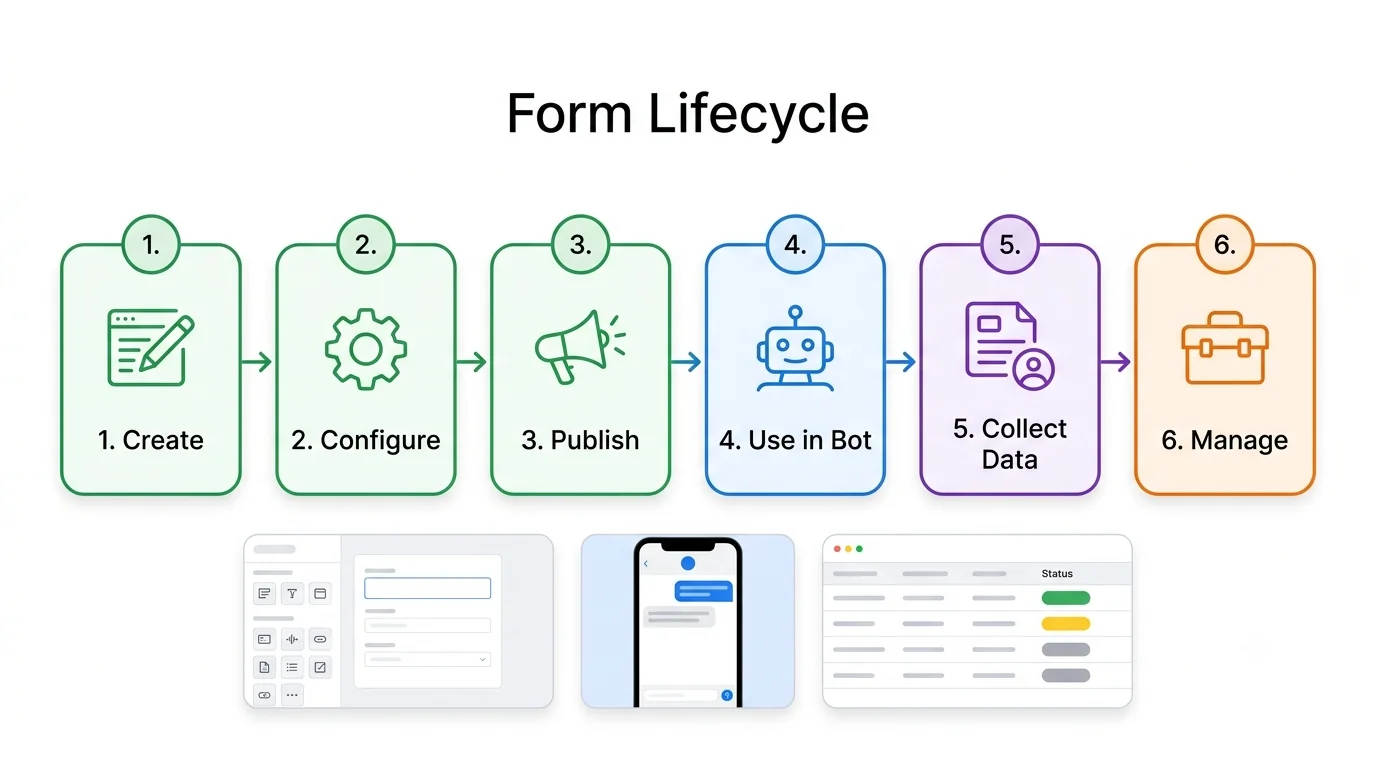
Example output — form lifecycle from the master end-to-end flow prompt
The Prompt
master-end-to-end-flow.md
Create a single presentation-ready infographic titled "[FEATURE] – END TO END FLOW" for [PRODUCT]. Use the example "[EXAMPLE BUSINESS]" throughout.

Layout:
- Header with title and lifecycle subtitle (Create → Configure → Publish → Use → Manage → Delete).
- Top strip: 8-10 numbered step cards joined by arrows, each with an icon, title and a 2-line description.
- Section A: detailed lifecycle flowchart with bullet sub-steps under each node.
- Section B: builder UI mockup (left component list, center canvas, right properties panel).
- Section C: management list view with filters, search, a Create button and 5 rows with status pills (Published, Draft, Archived, Deleted).
- Section D: usage example as a 4-5 node mini flow.
- Section E: end-user phone preview.
- Sections F, G, H: data flow, update/archive flow, delete flow.
- Footer: "KEY CAPABILITIES" bar with 8-10 icon + label items.
Every section has a letter and title. Titles under 4 words, descriptions under 12 words.

STYLE: Clean modern SaaS look, white background, thin rounded cards, soft shadows, one font family (Inter-style), consistent line icons. Color code: green = create/publish, blue = action/use, purple = user input, orange = manage/update, red = delete/danger. Solid arrows for the main flow, dashed arrows for optional or feedback paths. Use realistic sample data, no lorem ipsum. All text must be spelled correctly, short, and legible. No overlapping text, no watermark. 16:9, high resolution.
Negative prompt
Included when you copy the prompt
lorem ipsum, watermark, overlapping text, misspelled labels, cluttered tiny text, photorealistic people, 3D characters, dark theme unless asked
Replace every {{variable}} with your own details before running the prompt.
Collection: Product Flow Diagram Prompts
Examples
Example input
Fill the [BRACKETS] with your product, feature, and one example business.
What you should get
A presentation-ready diagram for Master End-to-End Flow.
How to use this AI photo prompt
- Upload a clear reference photo of your face (well-lit, front-facing works best).
- Fill any placeholders on this page, then tap Copy Prompt.
- Paste into ChatGPT (also works with Gemini, Flux) and generate.
- Keep your face locked - only wardrobe, pose, and scene should change.
Works best with ChatGPT / Gemini / Flux
Identity-preserving image-to-image prompts need a strong face reference. Avoid heavy beauty filters on the upload and use the negative prompt when your tool supports it.
Tips for better product flow diagrams results
- Match the example aspect ratio when your tool allows it (often 4:5 for portraits).
- If the face drifts, re-upload a sharper photo and keep the same prompt text.
- Copy related product flow diagrams prompts below to try alternate looks with the same identity lock.
When to use this prompt
Use it when
- You need a one-page visual of a feature, system, or process
- You will fill the bracketed blanks with one consistent example
Skip it when
- You need a photorealistic portrait or photo edit
How to get a good result
Done when
A presentation-ready diagram for Master End-to-End Flow.
Common mistakes
- Pasting without replacing {{placeholders}} or bracketed blanks.
- Asking ChatGPT, Gemini, Flux, or Midjourney for a shorter answer after a long structured prompt - that throws away the format rules.
- Stopping when the first draft appears instead of checking it against the success criteria below.
FAQ
- Which AI tools is this prompt written for?
- It works best with ChatGPT, Gemini, Flux, Midjourney. Copy the filled prompt and paste it into the tool you already use.
- What should a good result look like?
- A presentation-ready diagram for Master End-to-End Flow.
- What are common mistakes with this prompt?
- Pasting without replacing {{placeholders}} or bracketed blanks. Asking ChatGPT, Gemini, Flux, or Midjourney for a shorter answer after a long structured prompt - that throws away the format rules. Stopping when the first draft appears instead of checking it against the success criteria below.
Best for
- Product managers aligning a feature before build
- Founders and agencies who need a client-ready diagram
- Developers documenting architecture and integrations
Related Prompts
More prompts like this — same topic and style.