

Luxury Travel
Tropical Shoreline - Resort Look + Horizon Walk AI Photo Prompt




Identity-preserving tropical shoreline photo - same person from your upload, tasteful resort look, beach and ocean clearly visible.
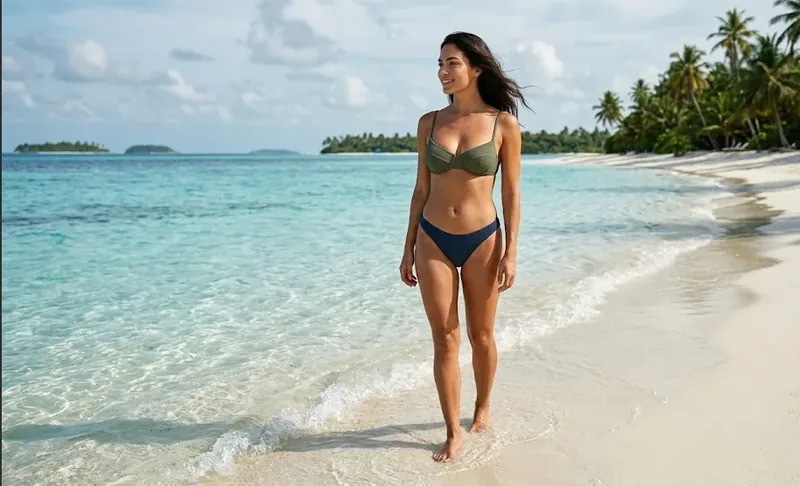
Example output - tropical shoreline, identity preserved
The Prompt
tropical-beach-shoreline.md
Use the uploaded photograph as the primary identity reference for the person. Preserve the same person shown in the uploaded image - their recognizable facial identity, facial features, natural appearance, hairstyle, age and realistic proportions. Transform the existing person rather than generating a different person. Do not replace them with a different person or generate a generic model.

Transform the uploaded photograph into a realistic luxury tropical vacation photograph. Place the same person standing barefoot at the edge of a crystal-clear turquoise beach, with white sand, gentle waves, palm trees and a beautiful tropical horizon.

Dress them in stylish, tasteful resort beachwear suitable for a luxury beach vacation, while keeping their recognizable identity and natural body proportions. Their hair should move naturally in the ocean breeze.

Position them naturally near the shoreline, looking toward the ocean with a relaxed vacation expression. Make the beach and ocean clearly visible around them rather than turning the image into a close-up portrait.

Use realistic tropical sunlight, natural skin texture, realistic shadows, detailed water reflections, wet sand, subtle atmospheric depth and professional travel photography. The result should look like a genuine photograph taken during their vacation, not an AI-generated model.

The visual priority is the destination and travel experience, not the person's body.

Identity preservation is the highest priority. Do not change their ethnicity or age, do not substitute another person, and do not create a generic influencer face or plastic AI retouch. Keep the same person shown in the uploaded image.

QUALITY: natural skin texture with visible pores, subtle catchlights, optically clean shallow depth of field, restrained cinematic color grade, fine natural film grain - never plastic AI skin.

Single photograph only. No collage, no grid, no duplicate person, no nudity, no sexualized framing, no text or watermark.
Negative prompt
Included when you copy the prompt
face swap, different person, generic AI face, celebrity likeness, influencer face, plastic AI skin, collage, grid, split screen, duplicate person, nudity, sexualized pose, sexualized framing, body-part emphasis, text, watermark, logo, CGI, cartoon, illustration
Replace every {{variable}} with your own details before running the prompt.
Collection: Luxury Travel Fashion
Examples
Example input
Upload a clear reference photograph of the same person you want preserved.
What you should get
A photoreal environmental shoreline framing travel-fashion photograph of the same person from the upload - identity locked, destination and composition clear.

How to use this AI photo prompt
- Upload a clear reference photo of your face (well-lit, front-facing works best).
- Fill any placeholders on this page, then tap Copy Prompt.
- Paste into ChatGPT (also works with Gemini, Flux) and generate.
- Keep your face locked - only wardrobe, pose, and scene should change.
Privacy: Upload your photo inside ChatGPT, Gemini, or your AI tool — not on this site. We don't store your photos.
Works best with ChatGPT / Gemini / Flux
Identity-preserving image-to-image prompts need a strong face reference. Avoid heavy beauty filters on the upload and use the negative prompt when your tool supports it.
Tips for better luxury travel results
- Match the example aspect ratio when your tool allows it (often 4:5 for portraits).
- If the face drifts, re-upload a sharper photo and keep the same prompt text.
- Copy related luxury travel prompts below to try alternate looks with the same identity lock.
When to use this prompt
Use it when
- You have a clear face reference photo to upload
- You want a destination + outfit transform with a specific camera technique
Skip it when
- Text-only generation with no uploaded identity reference
- Close-up beauty retouching without a travel scene
How to get a good result
Done when
A photoreal environmental shoreline framing travel-fashion photograph of the same person from the upload - identity locked, destination and composition clear.
Common mistakes
- Pasting without replacing {{placeholders}} or bracketed blanks.
- Asking ChatGPT, Gemini, Flux, or Midjourney for a shorter answer after a long structured prompt - that throws away the format rules.
- Stopping when the first draft appears instead of checking it against the success criteria below.
FAQ
- Which AI tools is this prompt written for?
- It works best with ChatGPT, Gemini, Flux, Midjourney. Copy the filled prompt and paste it into the tool you already use.
- What should a good result look like?
- A photoreal environmental shoreline framing travel-fashion photograph of the same person from the upload - identity locked, destination and composition clear.
- What are common mistakes with this prompt?
- Pasting without replacing {{placeholders}} or bracketed blanks. Asking ChatGPT, Gemini, Flux, or Midjourney for a shorter answer after a long structured prompt - that throws away the format rules. Stopping when the first draft appears instead of checking it against the success criteria below.
Best for
- Image-to-image travel edits
- Luxury fashion travel posts
- Composition practice
- Destination photography
Related Prompts
More prompts like this — same topic and style.

