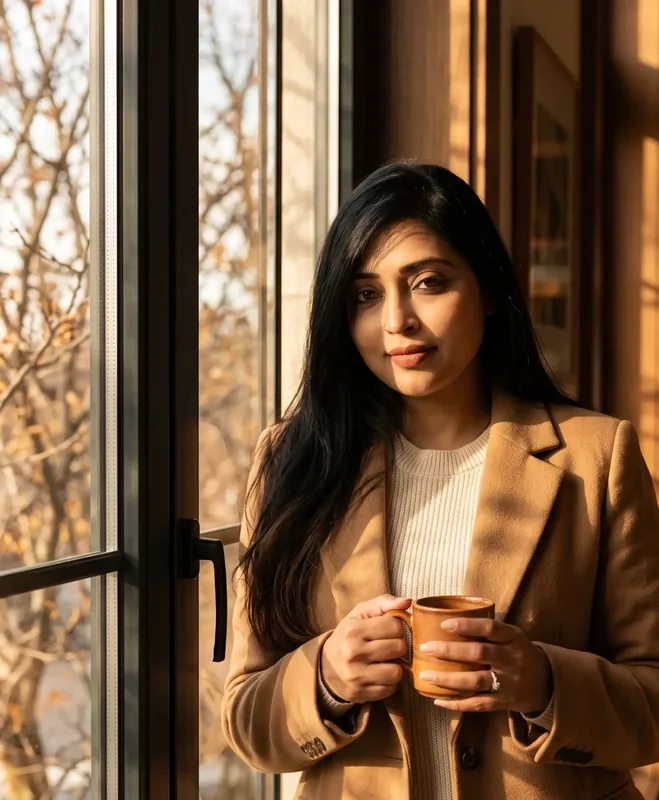
Portrait
SDXL Editorial Portrait - Natural Window Light AI Photo Prompt


A real pose, 85mm falloff, and low CFG so skin stays photographic. SDXL: 32 steps, CFG 5.5, DPM++ 2M Karras, hires 1.5× denoise 0.35.
The Prompt
sdxl-editorial-portrait-window-light.md
{{subject}} sitting by a large window in {{lighting}}, {{pose}}. {{skin_detail}}. Wearing {{wardrobe}}. Shot on {{camera}}, shallow depth of field, background softly blurred into warm bokeh from the window behind the subject. {{grade}}.
Negative prompt
Included when you copy the prompt
plastic skin, airbrushed, overexposed, waxy texture, extra fingers, fused fingers, mutated hands, symmetrical face, doll-like eyes, oversharpened, HDR look, cartoon, illustration, 3d render, watermark, text, logo, cropped forehead, cropped chin, bad anatomy
Fill in your details below - this prompt updates as you type, then copy it.
Fill in your details
0 of 7 filled. Preview updates as you type - then copy the finished prompt (negative prompt included when present).
sdxl-editorial-portrait-window-light.md
Prompt preview
{{subject}} sitting by a large window in {{lighting}}, {{pose}}. {{skin_detail}}. Wearing {{wardrobe}}. Shot on {{camera}}, shallow depth of field, background softly blurred into warm bokeh from the window behind the subject. {{grade}}.
Examples
Example input
Subject: A woman in her early 30s Lighting: soft mid-morning light Pose: resting her chin on one hand, looking slightly off-camera with a relaxed, thoughtful expression Skin detail: Freckled skin, visible pores, a few loose strands of hair catching the light Wardrobe: an oversized cream knit sweater, sleeve pushed up on one arm Camera: a Canon 5D with an 85mm f/1.4 lens Grade: Natural color grading, slight film grain, editorial photography style
What you should get
A woman in her early 30s sitting by a large window in soft mid-morning light, resting her chin on one hand, looking slightly off-camera with a relaxed, thoughtful expression. Freckled skin, visible pores, a few loose strands of hair catching the light. Wearing an oversized cream knit sweater, sleeve pushed up on one arm. Shot on a Canon 5D with an 85mm f/1.4 lens, shallow depth of field, background softly blurred into warm bokeh from the window behind her. Natural color grading, slight film grain, editorial photography style. Settings (SDXL): Steps 32 · CFG 5.5 · Sampler DPM++ 2M Karras · Hires fix 1.5x, denoise 0.35 · Checkpoint: Realistic Vision or Juggernaut XL Keep CFG around 5.5 - higher values push portraits toward plastic skin.

How to use this AI photo prompt
- Upload a clear reference photo of your face (well-lit, front-facing works best).
- Fill any placeholders on this page, then tap Copy Prompt.
- Paste into Stable Diffusion (also works with Flux) and generate.
- Keep your face locked - only wardrobe, pose, and scene should change.
Privacy: If you attach a face reference, do it in the AI tool. Codextroop Prompt Library never receives or stores your photos.
Works best with Stable Diffusion / Flux
Identity-preserving image-to-image prompts need a strong face reference. Avoid heavy beauty filters on the upload and use the negative prompt when your tool supports it.
Tips for better portrait results
- Match the example aspect ratio when your tool allows it (often 4:5 for portraits).
- If the face drifts, re-upload a sharper photo and keep the same prompt text.
- Copy related portrait prompts below to try alternate looks with the same identity lock.
When to use this prompt
Use it when
- You need help with art directors.
- You need help with concept artists.
- You need help with photographers.
Skip it when
- You only need a one-line ask with no constraints, format, or context.
- You cannot supply the fill-in details the template asks for.
- You want a modern digital look or heavy filter effect instead of the era/style this prompt targets.
How to get a good result
Done when
A woman in her early 30s sitting by a large window in soft mid-morning light, resting her chin on one hand, looking slightly off-camera with a relaxed, thoughtful expression. Freckled skin, visible pores, a few loose strands of hair catching the light. Wearing an oversized cream knit sweater, sleeve pushed up on one arm. Shot on a Canon 5D with an 85mm f/1.4 lens, shallow depth of field, background softly blurred into warm bokeh from the window behind her. Natural color grading, slight film grain, editorial photography style. Settings (SDXL): Steps 32 · CFG 5.5 · Sampler DPM++ 2M Karras · Hires fix 1.5x, denoise 0.35 · Checkpoint: Realistic Vision or Juggernaut XL Keep CFG around 5.5 - higher values push portraits toward plastic skin.
Common mistakes
- Leaving subject, lighting, pose vague - the model then invents placeholders.
- Asking Stable Diffusion or Flux for a shorter answer after a long structured prompt - that throws away the format rules.
- Stopping when the first draft appears instead of checking it against the success criteria below.
FAQ
- What do I fill in before I copy this prompt?
- Replace these placeholders with your details: subject, lighting, pose, skin_detail, wardrobe, camera, grade. Required fields are marked on the page. The prompt text updates as you type.
- Which AI tools is this prompt written for?
- It works best with Stable Diffusion, Flux. Copy the filled prompt and paste it into the tool you already use.
- What should a good result look like?
- A woman in her early 30s sitting by a large window in soft mid-morning light, resting her chin on one hand, looking slightly off-camera with a relaxed, thoughtful expression. Freckled skin, visible pores, a few loose strands of hair catching the light. Wearing an oversized cream knit sweater, sleeve pushed up on one arm. Shot on a Canon 5D with an 85mm f/1.4 lens, shallow depth of field, background softly blurred into warm bokeh from the window behind her. Natural color grading, slight film g…
- What are common mistakes with this prompt?
- Leaving subject, lighting, pose vague - the model then invents placeholders. Asking Stable Diffusion or Flux for a shorter answer after a long structured prompt - that throws away the format rules. Stopping when the first draft appears instead of checking it against the success criteria below.
Best for
- Art directors
- Concept artists
- Photographers
Related Prompts
More prompts like this — same topic and style.