

Art Style
Sci-Fi Concept Art Style AI Photo Prompt



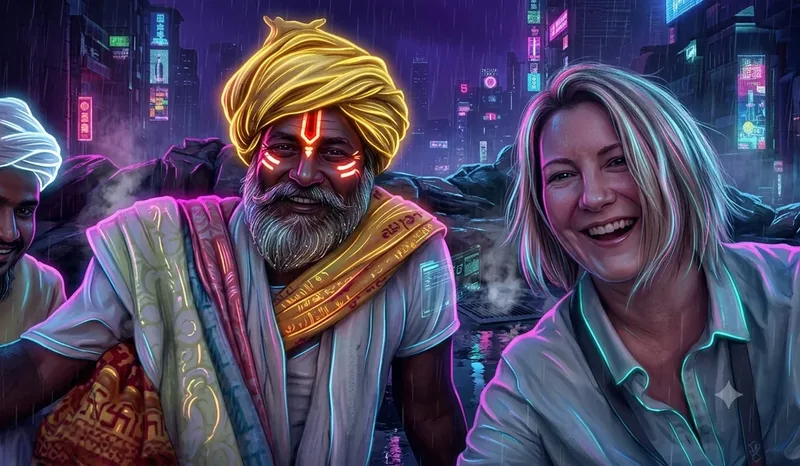
Renders any uploaded image (objects, characters, vehicles) in a detailed sci-fi concept-art style.

Example transformation output - Sci-Fi Concept Art Style
The Prompt
sci-fi-concept-art-style.md
Redraw the uploaded image in a detailed sci-fi concept-art rendering style. Keep the exact subject, shape, and design details from the original image unchanged - only add realistic material detail and lighting. Style: clean sci-fi concept-art rendering, metallic and glowing [color palette] accents, 8K resolution, sharp mechanical or atmospheric detail, dramatic rim lighting. Background: [keep original / futuristic city / space / simple studio backdrop]. No text or watermarks.Negative prompt
Included when you copy the prompt
text, watermarks, signature, logo, altered subject, changed face shape, distorted proportions, low resolution, blur, compression artifacts
Replace every {{variable}} with your own details before running the prompt.
Collection: Any Image to Art - 8K Style Transformation Studio
Examples
Example input
Upload any reference image (photo, drawing, doodle, or devotional image).
What you should get
An 8K illustration of the uploaded subject rendered in Sci-Fi Concept Art Style.

How to use this AI photo prompt
- Upload a clear reference photo of your face (well-lit, front-facing works best).
- Fill any placeholders on this page, then tap Copy Prompt.
- Paste into ChatGPT (also works with Gemini, Flux) and generate.
- Keep your face locked - only wardrobe, pose, and scene should change.
Privacy: Upload your photo inside ChatGPT, Gemini, or your AI tool — not on this site. We don't store your photos.
Works best with ChatGPT / Gemini / Flux
Identity-preserving image-to-image prompts need a strong face reference. Avoid heavy beauty filters on the upload and use the negative prompt when your tool supports it.
Tips for better art style results
- Match the example aspect ratio when your tool allows it (often 4:5 for portraits).
- If the face drifts, re-upload a sharper photo and keep the same prompt text.
- Copy related art style prompts below to try alternate looks with the same identity lock.
When to use this prompt
Use it when
- You have an uploaded image (drawing, photo, doodle, or logo)
- You want to change only the art style while preserving the exact subject
Skip it when
- Generating an image entirely from scratch without an upload
How to get a good result
Done when
An 8K illustration of the uploaded subject rendered in Sci-Fi Concept Art Style.
Common mistakes
- Pasting without replacing {{placeholders}} or bracketed blanks.
- Asking ChatGPT, Gemini, Flux, Midjourney, or Stable Diffusion for a shorter answer after a long structured prompt - that throws away the format rules.
- Stopping when the first draft appears instead of checking it against the success criteria below.
FAQ
- Which AI tools is this prompt written for?
- It works best with ChatGPT, Gemini, Flux, Midjourney, Stable Diffusion. Copy the filled prompt and paste it into the tool you already use.
- What should a good result look like?
- An 8K illustration of the uploaded subject rendered in Sci-Fi Concept Art Style.
- What are common mistakes with this prompt?
- Pasting without replacing {{placeholders}} or bracketed blanks. Asking ChatGPT, Gemini, Flux, Midjourney, or Stable Diffusion for a shorter answer after a long structured prompt - that throws away the format rules. Stopping when the first draft appears instead of checking it against the success criteria below.
Best for
- Image-to-art transformation
- Preserving uploaded subject in new art style
- Creative restyling for ChatGPT, Gemini & Midjourney
Related Prompts
More prompts like this — same topic and style.


