Product Photography
Clean E-commerce Product Photo AI Photo Prompt




Generate a marketplace-ready product shot: even lighting, true materials, and space for a listing crop.
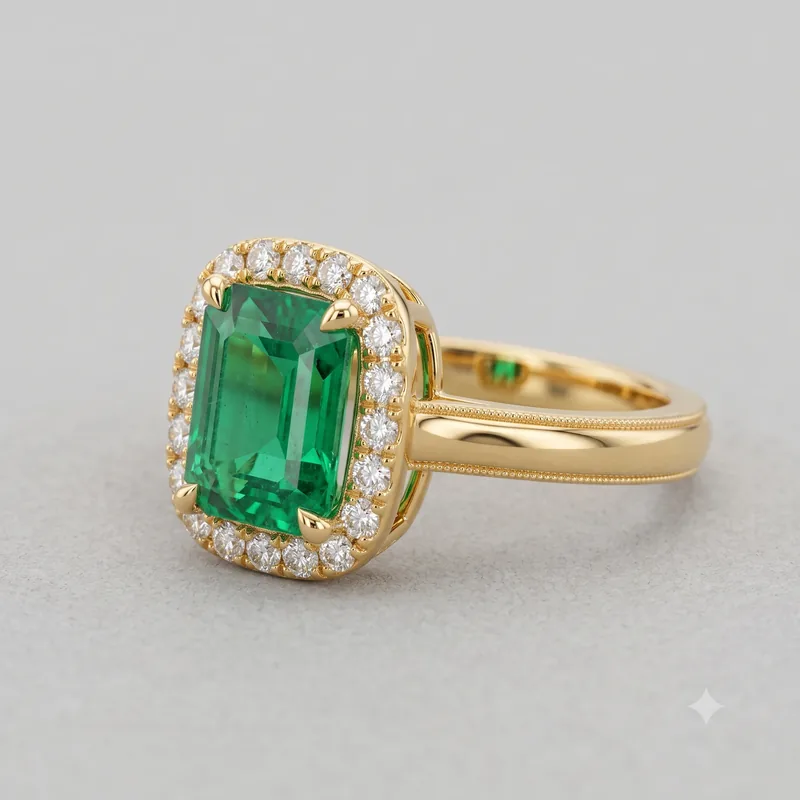
Example product shot - Gold emerald ring with diamond halo
The Prompt
ecommerce-product-photo-on-white.md
Act as a product photographer briefing an image model for a shop listing.

Product: {{product}}
Key materials and colours: {{materials}}
Background: {{background}}
Must show: {{must_show}}
Must not show: {{must_not}}

Write:
1. One prompt for a hero packshot (front 3/4, even studio lighting, true colour).
2. One prompt for a 45-degree detail crop of the most important material or feature.
3. Negative prompt - copy this block as-is unless the brief adds more:
hands, extra logos, fake reflections, extra products, unreadable labels, text, watermark, distorted handle, warped rim, melted geometry, plastic-looking ceramic, excessive gloss, artificial texture, floating product, harsh shadows, oversaturation, CGI appearance, lifestyle props.
4. Aspect ratios: 1:1 for marketplace grid; 4:5 for mobile product-detail page (PDP).

Rules:
- No lifestyle props unless the brief asks for them.
- No invented brand marks.
- Materials must look physically plausible (no plastic pretending to be glass).
Negative prompt
Included when you copy the prompt
hands, extra logos, fake reflections, extra products, unreadable labels, text, watermark, distorted handle, warped rim, melted geometry, plastic-looking ceramic, excessive gloss, artificial texture, floating product, harsh shadows, oversaturation, CGI appearance, lifestyle props.
Fill in your details below - this prompt updates as you type, then copy it.
Fill in your details
0 of 5 filled. Preview updates as you type - then copy the finished prompt (negative prompt included when present).
ecommerce-product-photo-on-white.md
Prompt preview
Act as a product photographer briefing an image model for a shop listing.

Product: {{product}}
Key materials and colours: {{materials}}
Background: {{background}}
Must show: {{must_show}}
Must not show: {{must_not}}

Write:
1. One prompt for a hero packshot (front 3/4, even studio lighting, true colour).
2. One prompt for a 45-degree detail crop of the most important material or feature.
3. Negative prompt - copy this block as-is unless the brief adds more:
hands, extra logos, fake reflections, extra products, unreadable labels, text, watermark, distorted handle, warped rim, melted geometry, plastic-looking ceramic, excessive gloss, artificial texture, floating product, harsh shadows, oversaturation, CGI appearance, lifestyle props.
4. Aspect ratios: 1:1 for marketplace grid; 4:5 for mobile product-detail page (PDP).

Rules:
- No lifestyle props unless the brief asks for them.
- No invented brand marks.
- Materials must look physically plausible (no plastic pretending to be glass).
Collection: AI Grid Prompts for Product & Fashion Photography
Examples
Example input
Product: handmade ceramic coffee mug. Materials: warm off-white stoneware, subtle natural speckling, smooth matte glaze, sturdy rounded handle. Background: seamless warm-light-gray studio with a clean floor transition. Must show: front three-quarter hero packshot, fully visible, plus a 45-degree close-up of the rim, glaze texture, and handle connection. Must not: hands, logos, text, extra products, lifestyle props, branding.
What you should get
Hero packshot: Create a photorealistic e-commerce hero packshot of a single handmade ceramic coffee mug, front three-quarter view, centered and fully visible. The mug has a warm off-white stoneware body with subtle natural speckling, a smooth matte glaze, and a sturdy rounded handle. Place it on a seamless warm-light-gray studio background with a clean floor transition. Use large diffused studio softboxes from both sides for even, neutral illumination, accurate white balance, controlled soft shadow beneath the mug, and true-to-life ceramic colour and texture. Show realistic glaze variation, slight handmade imperfections, natural edge thickness, and physically accurate ceramic surfaces. Use an 85mm product-photography lens, moderate depth of field, sharp focus across the mug, minimal perspective distortion, premium marketplace photography, clean composition, no decorative props, no text, no branding, no additional objects, no artificial shine. Detail crop: Create a photorealistic 45-degree close-up detail crop of the same handmade ceramic coffee mug, focusing on the matte stoneware surface, subtle mineral speckling, glaze texture, rounded rim, and handle connection. Preserve physically accurate ceramic thickness and small handmade variations. Use soft, even studio lighting with gentle highlights that reveal the surface without creating glossy or artificial reflections. Keep the background clean and neutral, softly blurred. Use an 85mm macro-style product photography perspective, shallow but controlled depth of field, crisp texture detail, accurate off-white colour, realistic pores and glaze variation, premium e-commerce photography, no lifestyle props, no branding, no text, and no additional products. Negative prompt: hands, extra logos, fake reflections, extra products, unreadable labels, text, watermark, distorted handle, warped rim, melted geometry, plastic-looking ceramic, excessive gloss, artificial texture, floating product, harsh shadows, oversaturation, CGI appearance, lifestyle props. Aspect ratios: 1:1 for marketplace grid; 4:5 for mobile product-detail page (PDP).
How to use this AI photo prompt
- Upload a clear reference photo of your face (well-lit, front-facing works best).
- Fill any placeholders on this page, then tap Copy Prompt.
- Paste into Flux (also works with DALL·E, Midjourney) and generate.
- Keep your face locked - only wardrobe, pose, and scene should change.
Privacy: If you attach a face reference, do it in the AI tool. Codextroop Prompt Library never receives or stores your photos.
Works best with Flux / DALL·E / Midjourney
Identity-preserving image-to-image prompts need a strong face reference. Avoid heavy beauty filters on the upload and use the negative prompt when your tool supports it.
Tips for better product photography results
- Match the example aspect ratio when your tool allows it (often 4:5 for portraits).
- If the face drifts, re-upload a sharper photo and keep the same prompt text.
- Copy related product photography prompts below to try alternate looks with the same identity lock.
When to use this prompt
Use it when
- You need help with store owners.
- You need help with marketplace sellers.
- You need help with product designers.
Skip it when
- You only need a one-line ask with no constraints, format, or context.
- You cannot supply the fill-in details the template asks for.
- You want a modern digital look or heavy filter effect instead of the era/style this prompt targets.
How to get a good result
Done when
Hero packshot: Create a photorealistic e-commerce hero packshot of a single handmade ceramic coffee mug, front three-quarter view, centered and fully visible. The mug has a warm off-white stoneware body with subtle natural speckling, a smooth matte glaze, and a sturdy rounded handle. Place it on a seamless warm-light-gray studio background with a clean floor transition. Use large diffused studio softboxes from both sides for even, neutral illumination, accurate white balance, controlled soft shadow beneath the mug, and true-to-life ceramic colour and texture. Show realistic glaze variation, slight handmade imperfections, natural edge thickness, and physically accurate ceramic surfaces. Use an 85mm product-photography lens, moderate depth of field, sharp focus across the mug, minimal perspective distortion, premium marketplace photography, clean composition, no decorative props, no text, no branding, no additional objects, no artificial shine. Detail crop: Create a photorealistic 45-degree close-up detail crop of the same handmade ceramic coffee mug, focusing on the matte stoneware surface, subtle mineral speckling, glaze texture, rounded rim, and handle connection. Preserve physically accurate ceramic thickness and small handmade variations. Use soft, even studio lighting with gentle highlights that reveal the surface without creating glossy or artificial reflections. Keep the background clean and neutral, softly blurred. Use an 85mm macro-style product photography perspective, shallow but controlled depth of field, crisp texture detail, accurate off-white colour, realistic pores and glaze variation, premium e-commerce photography, no lifestyle props, no branding, no text, and no additional products. Negative prompt: hands, extra logos, fake reflections, extra products, unreadable labels, text, watermark, distorted handle, warped rim, melted geometry, plastic-looking ceramic, excessive gloss, artificial texture, floating product, harsh shadows, oversaturation, CGI appearance, lifestyle props. Aspect ratios: 1:1 for marketplace grid; 4:5 for mobile product-detail page (PDP).
Common mistakes
- Leaving product, materials, background vague - the model then invents placeholders.
- Asking Flux, DALL·E, Midjourney, or Stable Diffusion for a shorter answer after a long structured prompt - that throws away the format rules.
- Stopping when the first draft appears instead of checking it against the success criteria below.
FAQ
- What do I fill in before I copy this prompt?
- Replace these placeholders with your details: product, materials, background, must_show, must_not. Required fields are marked on the page. The prompt text updates as you type.
- Which AI tools is this prompt written for?
- It works best with Flux, DALL·E, Midjourney, Stable Diffusion. Copy the filled prompt and paste it into the tool you already use.
- What should a good result look like?
- Hero packshot: Create a photorealistic e-commerce hero packshot of a single handmade ceramic coffee mug, front three-quarter view, centered and fully visible. The mug has a warm off-white stoneware body with subtle natural speckling, a smooth matte glaze, and a sturdy rounded handle. Place it on a seamless warm-light-gray studio background with a clean floor transition. Use large diffused studio softboxes from both sides for even, neutral illumination, accurate white balance, controlled soft …
- What are common mistakes with this prompt?
- Leaving product, materials, background vague - the model then invents placeholders. Asking Flux, DALL·E, Midjourney, or Stable Diffusion for a shorter answer after a long structured prompt - that throws away the format rules. Stopping when the first draft appears instead of checking it against the success criteria below.
Best for
- Store owners
- Marketplace sellers
- Product designers
Related Prompts
More prompts like this — same topic and style.